Govee Smart Bluetooth Thermometer Hygrometer H5074
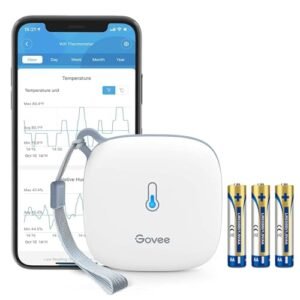
Protect your premium cigars by monitoring one of the most important factors in long-term storage—temperature and humidity. The Govee Smart Bluetooth Thermometer Hygrometer H5074 provides accurate environmental monitoring with real-time Bluetooth connectivity, customizable alerts, and detailed historical data, helping you maintain ideal humidor conditions.
Its compact design fits easily inside desktop humidors, cabinet humidors, coolidors, wineador conversions, and other enclosed storage spaces without taking up valuable room.
Smart Bluetooth App Monitoring
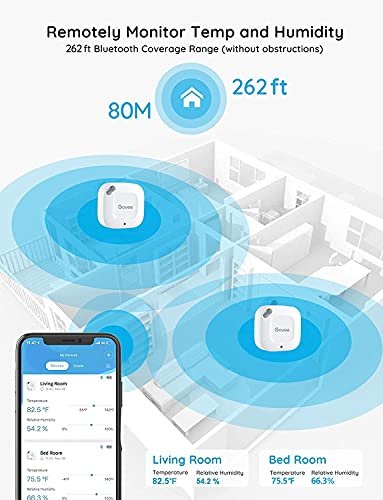
Monitor your temperature and humidity readings directly from the Govee Home App using Bluetooth connectivity with a range of up to 262 feet (80 meters) in open areas without obstacles.
View current conditions anytime without opening your humidor, helping preserve stable humidity levels.
Note: This model uses Bluetooth and does not support Wi-Fi connectivity.
Swiss-Made Precision Sensor
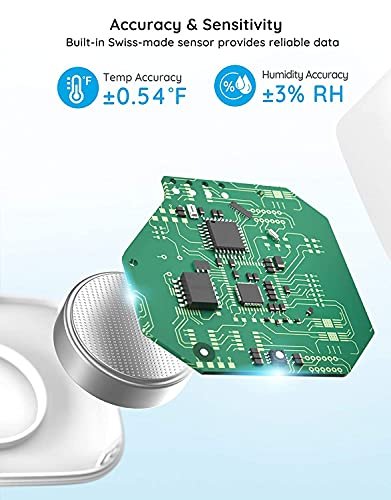
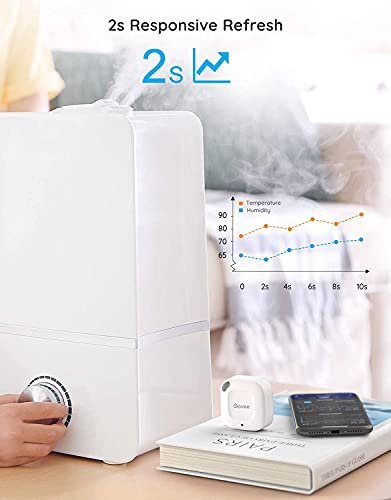
The built-in Swiss-made sensor delivers dependable environmental monitoring with fast updates every 2 seconds.
Measurement accuracy:
- Temperature Accuracy: ±0.54°F (±0.3°C)
- Humidity Accuracy: ±3% RH
- Refresh Rate: Every 2 seconds
Accurate readings help you make informed adjustments to your humidor before cigars are affected.
Smart Alerts
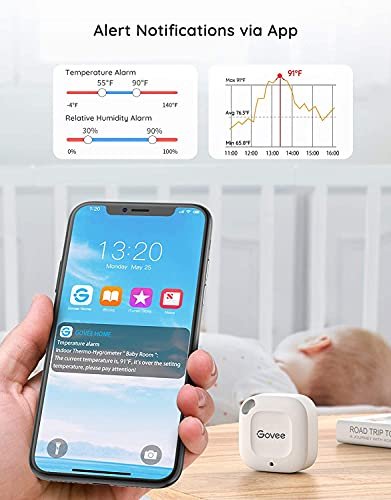
Customize your preferred temperature and humidity ranges in the Govee Home App.
If readings move outside your preset limits, you’ll receive an instant Bluetooth notification while within connection range, allowing you to respond quickly and protect your cigar collection.
Historical Data & Export
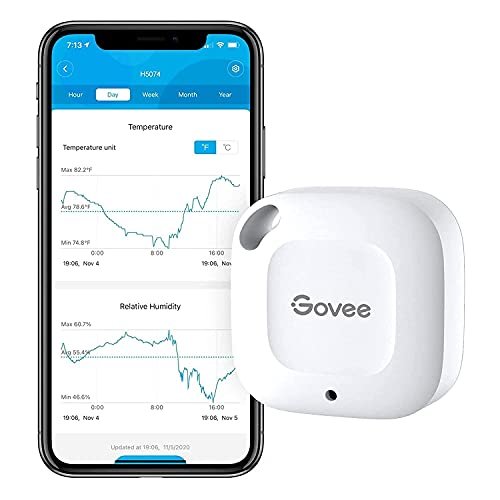
Track environmental conditions over time using the companion app.
Features include:
- Up to 20 days of onboard data storage
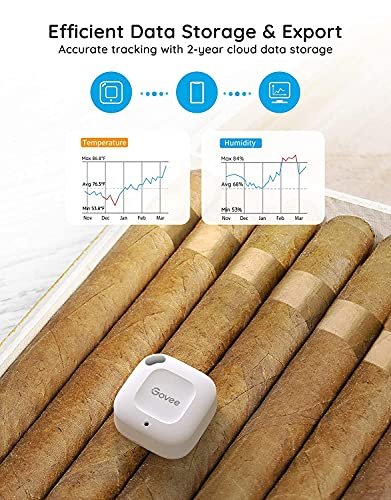
- Historical graphs
- Export up to 2 years of temperature and humidity data in CSV format
Historical tracking is ideal for monitoring seasonal changes or verifying long-term humidor performance.
Compact Design
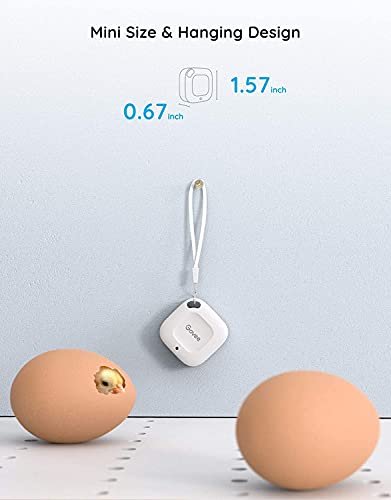
The H5074’s lightweight, space-saving design fits comfortably inside virtually any humidor without interfering with cigar storage.
Its built-in hanging hole also allows convenient placement in:
- Desktop humidors
- Cabinet humidors
- Coolidors
- Wineadors
- Greenhouses
- Incubators
- Storage cabinets
Features
- Bluetooth smart monitoring
- Govee Home App compatible
- Up to 262-foot Bluetooth range (open areas)
- Swiss-made precision sensor
- Temperature accuracy: ±0.54°F
- Humidity accuracy: ±3% RH
- Updates every 2 seconds
- Instant customizable alerts
- 20-day onboard storage
- Export up to 2 years of historical data
- Compact, lightweight design
- Hanging hole for flexible placement
Perfect For
- Desktop humidors
- Cabinet humidors
- Coolidors
- Wineador conversions
- Premium cigar collections
- Greenhouses
- Incubators
- Storage monitoring
- Home and office use
Whether you’re protecting a handful of premium cigars or managing a large humidor collection, the Govee Smart Bluetooth Thermometer Hygrometer H5074 provides accurate monitoring and convenient app-based control to help maintain optimal storage conditions.


Govee is a global leading smart home brand dedicated to providing personalized and fun life experiences through continuous innovations.
With the help of our smart sensors and Govee Home app, you can enjoy a healthier, safer and more convenient lifestyle.


sabO –
very COOL thermometer
Highly recommend. I’ll start off with noting one of the most useful things that happened within a month of owning this freezer thermometer. The power went out but it happened while we were not home. I was able to look at the temperature readings to get an estimate of how long the outage lasted and if any food was affected. I love having the temperature graph to see if the temps dipped higher or lower than they should. It’s very easy to read and keep track of. It also shows you the battery life which is great. Not a product issue but a phone issue is that my widget for the Govee Home App displays an outdated temperature and to get a current accurate reading you do have to open the app to update. I’ve had no issues with connecting to the app from any location thus far.I had bought a different brand before but didn’t realize it required a hub to function. Not the case with this freezer thermometer. It is a small cute size so doesn’t take up much space and has worked well. I do have a manual thermometer to compare against for temperature accuracy.It says it handles down to -4 degrees Farenheit which is true. My freezer dips below that frequently maybe up to -9 degrees and the thermometer is still kicking. But again it’s only been a month so we shall see how long the battery lasts being pushed.
36 people found this helpful
Jacqueline AriasJacqueline Arias –
Reliable Humidity Monitor – Great Value, Safe Battery Design, Accurate Readings
We purchased three of these mini Govee Bluetooth hygrometers to monitor humidity while running the air-conditioning, which had been drying out my husband’s skin. Our target is around 48% humidity, and these sensors have been spot-on across multiple rooms.Setup was simple since we already use the Govee App. This model connects via Bluetooth only, which works well for our home layout.At the time of writing, the product listing incorrectly says no battery required – it actually takes a CR2477 battery, which is included. The battery compartment is secured with three small screws, a thoughtful safety feature that prevents children or pets from accessing the button cell.Performance has been reliable and consistent. The temperature and humidity history in the app makes it easy to spot trends and adjust the environment. For the price, it’s excellent value+ simple, safe, and accurate.
24 people found this helpful
Subway Hamster –
Historical capture of data is the true value
These sensors are great for when you have a fridge that’s acting up and you want to track the temperature fluctuations. Using this sensor, I can see that my fridge, over time, had been getting worse at keeping the temperature within an appropriate range. This helped me better time my new fridge purchase. However, I would suggest that anyone can benefit from such a sensor, and you can bet that this sensor will be put into my new fridge from the start.I have two of these Grovees – one for the normal fridge and another for the tabletop mini fridge that I use for skin care products. The first sensor I got works extremely well and supplies data to the cellphone smoothly. The second one occasionally drops data, say an hour here or two hours there. It’s annoying but not a deal breaker. The app itself provides adequate current and historical data via numbers and graphs. The historical graphing updates slower than I like, but that’s a minor complaint.The historical graphing is what makes this sensor worthwhile to me. It shows you the normal temperature swings as a fridge warms up for the short defrost cycle and cools back down for the appropriate cooling of the food. Once you have that baseline of data, then you can graphically see when the fridge is doing something unusual. My dying fridge, over time, started showing more extreme ups and downs every so often, with short bouts of extreme temperatures that are not great for food. This is a great way to monitor and address issues with cooling before it gets to the point where your food is spoiled.
16 people found this helpful
Josh O –
Easy to set up and does what it’s supposed to.
I got the two pack. Set up was trivial and they work as intended (tracking temp and humidity). Not much more to say – it’s nice to have something simple that just works. The app is more complicated than it needs to be, but the extra functionality doesn’t get in the way.
Amazon CustomerAmazon Customer –
Remote humidor monitoring
Fantastic product. It lets me monitor the humidity and temperature in my humidor remotely. I have a large end table humidore so I put one of these on each level.
4 people found this helpful
K. M. Cavuoti –
Works great
I use this in my dog’s crates when I’m traveling to be sure the AC is keeping them cool. Works with my iPhone easy to set up, small and can be placed out of the way so dogs don’t bother it.
7 people found this helpful
yangmungiyangmungi –
Functional, with limitations and rough software issues.
I currently have 9 of these sensors (H5074); I should’ve stopped at 4.I also have a Govee humidifier H7140. The integration is satisfactory.If all you want is some temperature based automation for other Govee products, getting a limited number of these will work pretty well for you.If all you care is the current temperature in multiple locations, this system works fine.It also has integration with some open-source smart-home software, but it will only be able to track current temperature, and (while I haven’t really dived deep into the issue) has some issues being registered with both the smart-home service as well as the Govee Home app. I would guess that this is probably a Bluetooth issue, and not specific to Govee.My primary issue is with the measurement history. As I feel like my use case with the history is not the most common usage, I’ve let it affect 2 stars.TLDR – invest in the SensorPush system if you want temperature history.1. If you don’t refresh or fetch the data periodically (I’ve found every 5 days to be somewhat of a maximum), some data seems permanently lost. I’ve attached a photo showing time gaps in exported CSV data.2. Even if you do refresh data periodically, the data will sporadically have gaps, unless you explicitly refresh again. This means, if you want to avoid having any data gaps, that every few days, you will need to open your Govee app, then for each sensor you have, wait for the initial refresh to finish, manually refresh the data, wait for the data to be fetched to your phone, then refresh the data again. This also sometimes fails to work; luckily you can just back out of the sensor’s view and back in and continue the data refresh. It can take up 30 seconds for the first refresh, then another 15 seconds for the manual refresh, then another 10 seconds for to wrap any any potentially missed data points. This means in the best case, it’s something like 30 seconds per sensor, worst case, maybe up to 2 minutes (due to retries). That means with 9 sensor, it can take anywhere from 5 minutes to 20 minutes to fetch all the information from the devices to the phone. Also, most of the time is just waiting; in terms of interaction, it’s about a total of 20 seconds of interaction but dotted throughout many periods of waiting. Compared to the SensorPush system, which requires just a one-time sync (that is also more performant) that maybe takes about 5 seconds total to refresh 7 sensors, at best, the Govee system is 5900% slower to fetch data. There is a clear price difference; however, as you scale up on sensors, the SensorPush system becomes a much better value proposition (at least for your sanity).3. Exporting data is janky at worst. Specifically, there is an option “Export data of all other devices,” which sometimes works if the data exported is small enough; otherwise, even though the option is checked, only the data from the sensor which you are viewing will be exported. I haven’t experimented with exactly where the “Export data of all other devices” stops behaving as expected, but I have not been able to export weekly 1-minute data using this option. This means, to export my 9 sensors of data, I need to go to the select the sensor, scroll down to “Export Data”, select the “Send to account email” checkbox, set the “Start time” (which is a custom time selector, and doesn’t support direct typing, so I have scroll the year, month, day, hour, and seconds to the desired value), set the “End time” (which has the same issues as the “Start time”). Then I contemplate my life and whether the “Export data of all other devices” button will work (which it has not so I usually don’t check it), then export the file. Then I need back out twice then repeat this for the remaining devices. One minor nitpick is that, if you export enough data, the file is compressed using ZIP; the name of the compressed file is “export.zip” which is a bit less convenient than the uncompressed filename, which contain the sensor name.There is documentation stating that deleting and reinstalling the app, then refreshing the data will fix this… This seems like an unacceptable solution, and even if reinstallation fixed the data issues, it wouldn’t change my opinion.Unrelated to measurement, there is a feature called “Timed Export” in the device export view; but I have yet to understand what qualifies as a “gateway” in the “Pair with a gateway first” message.There is a built-in support chat in the app. This works OK, but when I used it, it was a bit marred by mild UX issues and what seemed like a language barrier. I’ve only used it once; I decided to just use SensorPush instead.Last minor gripe, is they tend to advertise their own products a lot on the app. This is fine, as it is their app, but it seems a bit excessive. Lastly, even though they do advertise their own products in the app, I have yet to understand exactly what a “gateway” is.I haven’t used other temperature systems, like Ecobee’s, so I can’t compare there.
23 people found this helpful
K –
Seem solid so far
Initial thoughts are these have been consistent and reliable. I tossed one of these in my HVAC return and another in the cold side compartment (hung safely away from moving parts and suspended so it’s not interacting with anything but cold air) to monitor my temperature splits after having an HVAC issue in our hot Florida climate.~$10 each isn’t bad for some peace of mind and ease of monitoring. Hopefully battery life is good, but these low powered devices seem to last a good while before their batteries need to be replaced.
3 people found this helpful
A. Oldham –
These are handy for hatching
I got these to monitor the temp and humidity for multiple incubators. It really works great for that. But there are some things to know about this product up front. One is that the batteries will come loose when you pull the tab. if the batter is rattling in the item you will need to open it up and seat the battery into the socket properly. then it will work. Second issue is there is absolutely no way to identify which one of these is which if you have multiple unless you do so at discovery. If you plan on having more than one of these, bring them online one at a time. Write the 5 Character identifier on the side of each hydrometer as you bring each one online. That way you know which is which because the app has no place where it tells you the serial number of the device. The app is really the drawback of this product and why it didnt get 5 stars.
zambonizamboni –
Home Info Center: a great option, though not perfect
I got this sensor to create a simple “information center” out of an old iPad, for use in my RV. This just involves setting up the “home screen” of the pad with widgets from various apps like weather, calendar, etc. Using iOS widgets lets me make a flexible, easy-to-read display that’s user friendly without any special software or setup. Importantly, it uses BT instead of WiFi, since I don’t have a router in my RV. It mostly gets the job done and for the money it’s hard to complain. It could be a little better, though.WIDGETSI chose the Govee over all others because it was the only option I found that offered iOS widgets. The widget has Dark and Light mode versions, which is nice. There are small, medium, and large sizes. The small can display one sensor; the other two display multiple sensors. You get sensor name, date and time, picture of the device, temp readout, and humidity readout…which is actually too much.This does meet my needs, but I’m disappointed that the most important info — the temp and humidity — are very small and hard to see due to sharing space with all that extra info, and especially the picture of the device, which is *pointless since it never changes*. Widgets should display whatever the app specializes in ONLY, not a whole cluster of the same redundant info I can get anywhere else. It’s like having the clock on the wall, on the microwave, on the DVD player, on the coffee maker…I’d prefer to see only device name and measurements. The smallest widget would ideally (for me) show just one user-chosen measurement, allowing very customizable and easy-to-read layouts. The other widget sizes are better suited to fitting in more measurements and/or more sensors. I hope Govee will add easier-to-read widget options in a future app update.PERFORMANCEAside from this, the device itself performs fine. I have no “calibrated” thermometer to compare it with, but the numbers agree with various other devices and they update often. If I pick it up in my hand I see the temp go up pretty much right away. I’m happy with how compact it is.Setup was fast and easy. No registration or signup required to add the device to the app, and connecting to the sensor went smoothly. I The instructions are written in a way that seems like you can add a sensor directly from the app, but in iOS at least you need to pair to the sensor in Settings (the conventional way) before the app will see it. This is plenty easy.I have my sensor in an exterior compartment that’s enclosed in metal. It’s only about 10 feet from my pad but there’s quite a lot of obstructions between them, and I have no trouble with the connection.INSTALLATIONThe device itself is surprisingly small; only a little larger than its widget displaying on my iPad! This makes it easy to slip into just about any spot. The only physical change I suggest to the case is a second mounting hole, which would make it much easier to secure against movement and vibration. The hole is located on a face that’s angled so if you try to (lightly) secure it with a screw, it doesn’t sit flat – the beveled edges of the case make it “wheelie”. A second hole (or simpler case design) would help with that.BATTERYThe batteries are CR2477 coin cells, which are a rather large and totally unfamiliar size of coin cell for me in the US. One cell is about the size of 4 US quarters stacked up. These are tough to find in local stores (though of course AMZ has them) but their energy capacity is almost 5 times that of a common CR2032 so I expect they will last quite a while — though I haven’t had it long enough to say. I don’t know if it sends a “low batt” message to the app/widget (but that’d be a nice feature).
34 people found this helpful